

Keep your original spreadsheet
Make a backup before changing your concert archive. Work on a copy so you can adjust dates, artist names or venue names without losing your original records.
A CSV is a plain-text table. It does not preserve spreadsheet formatting, multiple sheets or embedded photos. Keep those original files separately.
Prepare the file for your installed version
- Open the CSV import instructions in your installed version of Concert Craze. Use the column names, date format and any template provided there.
- Review your records for duplicate shows, inconsistent artist or venue names and dates that may have been interpreted differently by your spreadsheet app.
- Export the relevant sheet as CSV. If your spreadsheet offers an encoding choice, UTF-8 preserves accented artist and venue names.
- If your app version allows a small import, try a few records first and check the results before continuing with the full archive.
This guide covers preparation rather than defining the importer’s file schema. Follow the instructions in your app for the exact required fields and supported values.
Check your diary after importing
Compare the imported entries with your spreadsheet. Check a selection of dates, artists and venues, especially records containing accented characters or dates that could be read as either day/month or month/day.
Review what is already in your diary before importing the same file again. Once your records are in place, you can build on them with photos and notes and explore your concert statistics.
Review the preview before adding concerts
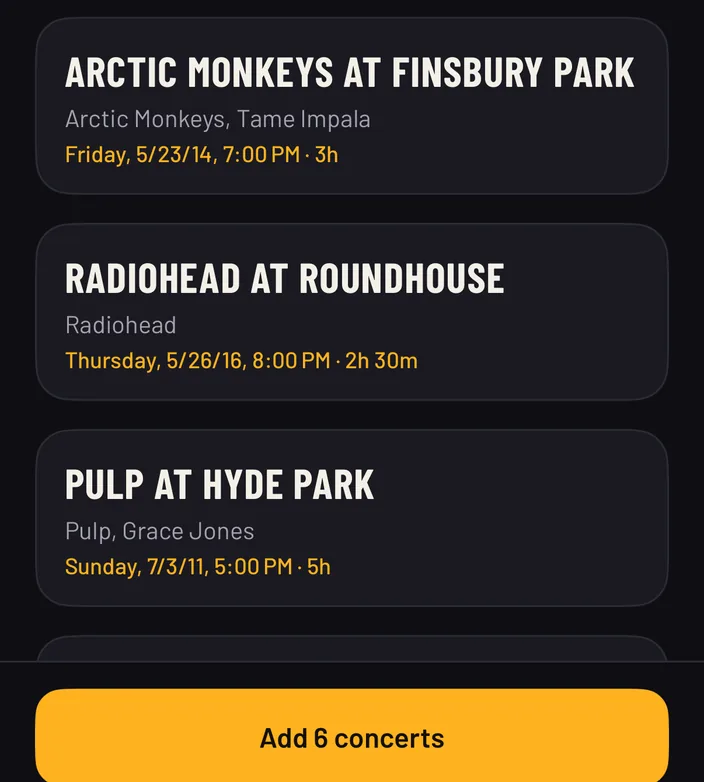
The current import screen lists the concerts read from your file before saving them. It shows the show name, artists and date, with a button to add the reviewed concerts and an option to choose a different file.
Take a moment to compare that preview with your spreadsheet. A date can look valid while still using the wrong day and month. If several records look wrong, correct the working copy of your file before confirming the import.
Need help with a file?
Contact [email protected] with your app version and a description of what happened. If a sample is needed, use a small example with personal notes and other private information removed.
Questions about this guide
Can a concert CSV include my photos and ticket files?
A CSV contains table values, not embedded pictures or documents. Keep your original photo and ticket files, then add them to the corresponding concert entries after checking the imported records.
What should I check before confirming an import?
Review the preview’s artists, dates, times and venues against your original spreadsheet. The review screen lets you check the concerts before selecting the button to add them. Follow the controls and instructions in your installed version.
Keep your next concert in Concert Craze
Free to download for iPhone and iPad, with an Apple Watch companion. Some features require Pro; see the App Store for compatibility and current purchase options.
Download on the App Store (opens in a new tab)